The main difference between Viral Loops and UpViral is the type of referral marketing they help with.
Viral Loops helps you create ongoing referral programs and prelaunch campaigns, while UpViral puts more emphasis on giveaways, sweepstakes, and other promotion-led campaigns.
In this guide, you will see a comparison of the two platforms’ features, pricing, and integrations. We will also look at the campaign types they offer, their UX, and customer reviews so you can better understand each and see which one lines up better with the campaigns you want to run.
Let’s get started.
Disclosure: This article was created by Viral Loops and may reference its own products and services. The content reflects the author’s perspective and is based on publicly available information, accurate as of September 2026. Companies and tools are listed for informational purposes only and are not ranked or endorsed unless explicitly stated.
What is Viral Loops?
Viral Loops is a referral marketing platform that lets businesses build referral programs or giveaways from ready-made, no-code templates.
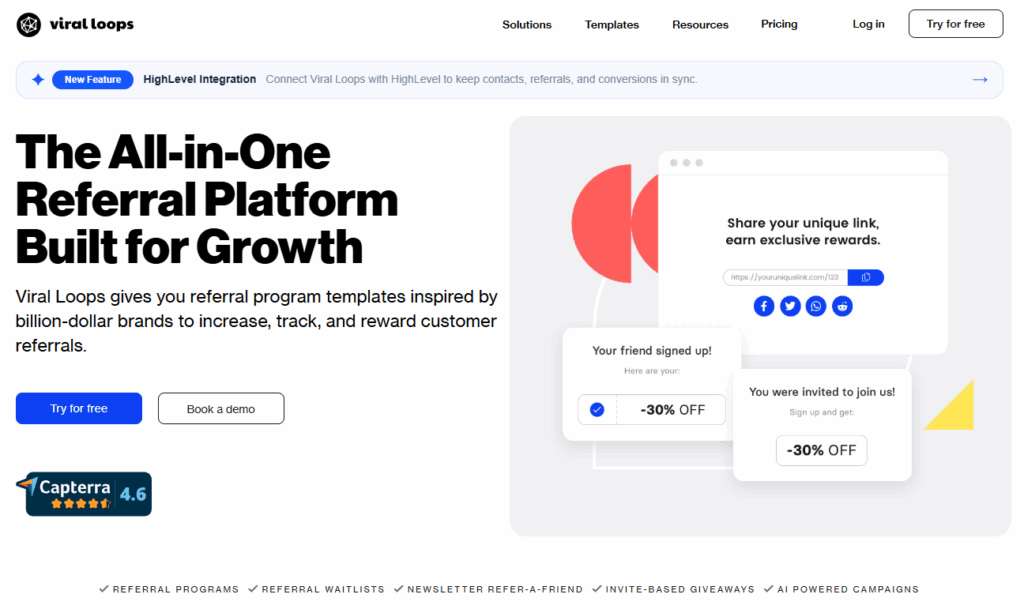
Startup founders can use prelaunch waitlists to build interest before launch, while Shopify stores and newsletter publishers have templates designed for their audiences. Businesses can also use milestone rewards across different campaign types, giving participants access to rewards when they reach specific referral targets.
Viral Loops tracks successful referrals and helps teams manage rewards, with manual or automated fulfillment options depending on the campaign setup.
What is UpViral?
UpViral is a referral marketing platform for businesses seeking to generate additional sign-ups from their current leads.
Marketers can run referral contests or sweepstakes that reward participants for making referrals.
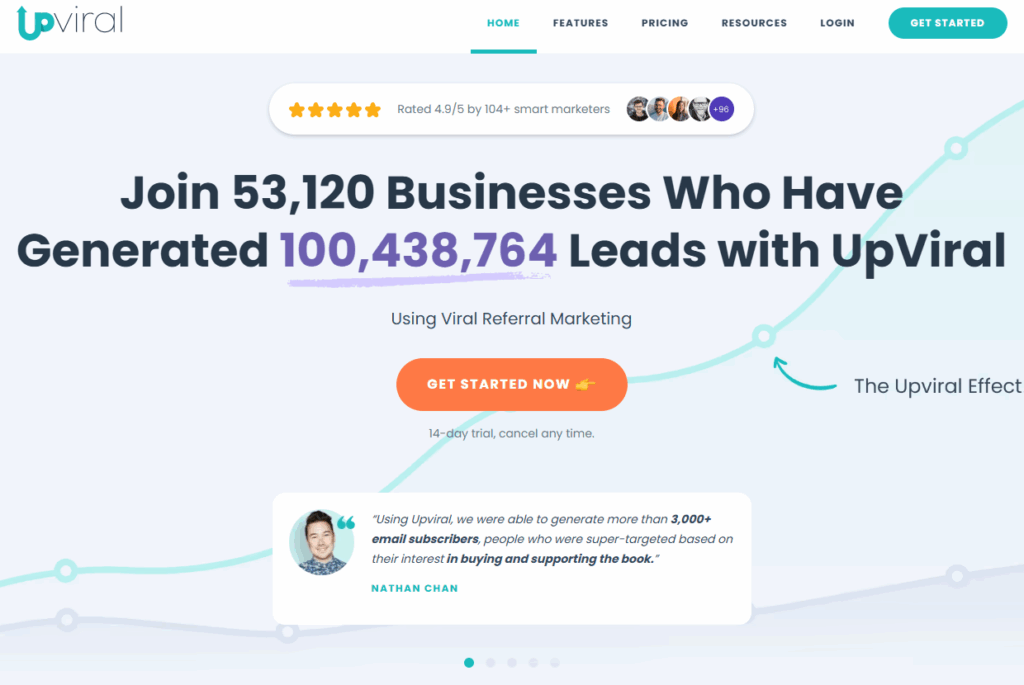
The platform gives each participant a unique referral link, while landing pages and referral tracking tools make it easier to monitor campaign activity.
UpViral is best suited for lead generation and email marketing campaigns.
Viral Loops: Pros & cons
Viral Loops offers several referral program formats, including customer referrals, prelaunch campaigns, newsletter referrals, and invite-based giveaways.
But how well does it work in practice?
To get a better idea, we reviewed user feedback on Capterra, G2, and Trustpilot. Here’s what they like about the platform and where they think it could do better.
Viral Loops pros
Viral Loops offers several ways to set up referrals without building the campaign flow from scratch. The biggest advantages come from the flexibility you get in reward and participant management, plus campaign setup.
Some of the main advantages include:
- Templates come with referral flows already mapped out for different goals, which saves setup work when launching a new campaign.
- Milestone rewards, two-sided incentives, leaderboards, and referral-based giveaway entries bring gamification into campaigns in different ways.
- You can change campaign copy, buttons, fonts, and other design details without code, with further customization available through CSS and HTML.
- Built-in fraud detection flags suspicious participants using several risk checks, so teams can review questionable referrals before granting rewards.
These options give you plenty of control over how a campaign works.
Viral Loops cons
There are also a few areas where Viral Loops could improve:
- Even if the provided templates cover most of the setup, making more specific changes to a campaign’s design can require technical knowledge or coding.
- With multiple campaign types to choose from, some users say it can take some experimenting to figure out which one works best for your referral campaign.
- Connecting to existing marketing tools can be tricky, especially when there isn’t a direct integration available.
UpViral: Pros & cons
UpViral allows you to build referral campaigns and viral contests, with templates, a drag-and-drop editor, several ways to display a campaign, and tracking tools built in.
To see how well the platform actually works, we checked what users have to say on G2 and Capterra.
UpViral pros
A well-structured contest gives people a reason to keep participating even after they sign up. UpViral helps you create that momentum through points, rewards, and competition.
Some other advantages are listed below:
- A leaderboard ranks contest participants by performance, which works well for campaigns built around friendly competition.
- Milestone rewards can unlock automatically after someone reaches a set number of referrals, and the platform can automatically grant digital rewards.
- Weighted social shares let you assign different point values to specific sharing actions based on where you want participants to promote the campaign.
- Built-in split testing lets you compare page variations and email follow-ups instead of relying on one version for the whole campaign.
UpViral cons
There are also a few drawbacks to consider:
- The platform can be confusing at first, and getting familiar with all the features can take some time, especially when setting up your first campaign.
- Some reviewers say that depending on the software you use, you may have to rely on webhooks or other workarounds to set up integrations.
- Embedding campaigns on existing websites could be easier.
- Editing campaign pages and making the layout look or work the way you want can take more effort than expected.
Comparison point #1: Features
Viral Loops and UpViral both cover the core jobs you would expect from referral software. You can create campaigns and their pages, collect participant data, track activity, and manage rewards.
However, the feature lists start to diverge once you look at how each platform handles those jobs.
Viral Loops organizes much of its setup around referral flows and conversion goals, while UpViral gives more space to contest mechanics, page testing, and participant-level campaign data.
Viral Loops features
The Viral Loops feature set covers the full campaign cycle from choosing a referral format to checking what happens after people start sharing.
- Template-based referral programs provide ready-made setups for customer referrals, newsletters, Shopify stores, prelaunch campaigns, and other common referral formats.
- Viral Loops Page Builder includes a no-code landing page builder for creating and hosting a campaign page directly in Viral Loops.
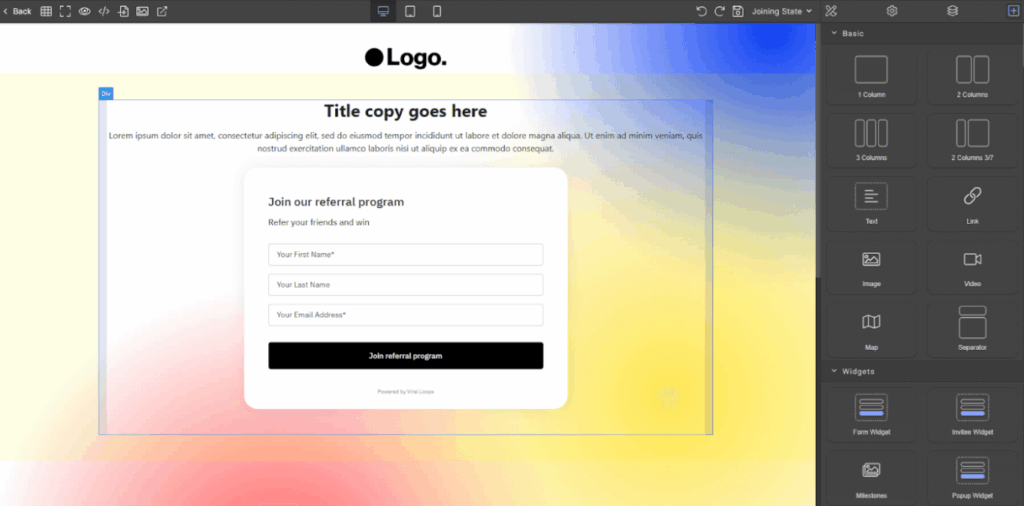
- Form Widget collects a visitor’s name and email address so they can join a campaign, then switches to sharing options after signup so the new participant can start referring others.
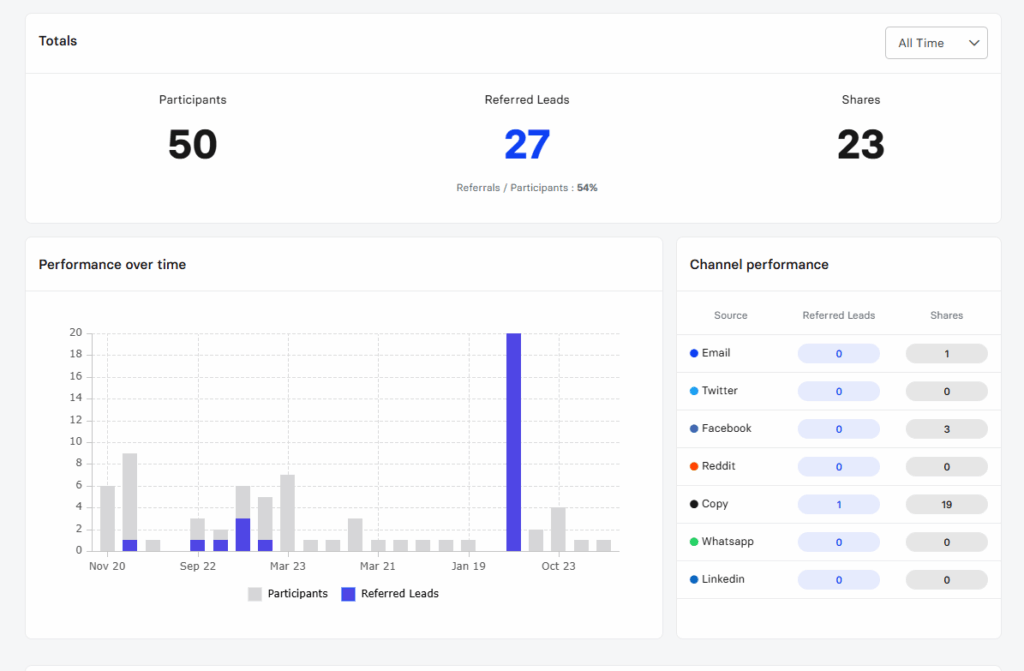
- Real-time metrics show participants, referred leads, shares, and successful referrals, while downloadable CSV reports provide more campaign data for analysis.
- Rewards management tracks pending rewards and supports manual fulfillment or automated delivery through connected tools on eligible plans.
- Campaign dashboard lets you search participants, edit participant details and referrals, import contacts, export campaign data, and test conversions manually.
UpViral features
The tools here lean toward contests, sharing, and lead capture, with several features working together inside the same campaign.
- UpViral Reward System lets you create and deliver rewards for each individual participant, promotion, or niche.
- UpViral Sweepstakes provides ready-made templates for running giveaways where participants can earn entries by referring others. You can also combine sweepstakes with milestone rewards to offer prizes for reaching referral targets.
- Templates for the whole funnel include ready-made layouts for the landing page, share page, and closed campaign page.
- Visual Template Editor offers WYSIWYG editing to change the design of the campaign pages without editing the underlying code.
- Campaign View tracks traffic, leads, referrals, and conversion rates over time.
- 10 Custom Fields lets you collect extra participant details beyond an email address, including information you choose to collect for your campaign and answers to short surveys or additional sign-up questions.
- Unlockable Milestones releases rewards when participants reach referral targets such as three, five, or ten successful referrals.
Which is better?
When it comes to features, Viral Loops makes more sense if you want a referral marketing platform built around different referral formats. Customer referrals, newsletter programs, prelaunch campaigns, Shopify referrals, and invite-based giveaways each have a setup designed around that goal.
UpViral suits campaigns that lean more heavily on contests. Its sweepstakes tools, split testing, participant insights, and point-based sharing options give you more ways to experiment with competition and campaign pages.
For an ongoing referral program solution with different ways to earn and track referrals, Viral Loops offers the broader setup. UpViral has the edge when contests and campaign testing are central to the strategy.
Comparison point #2: Pricing
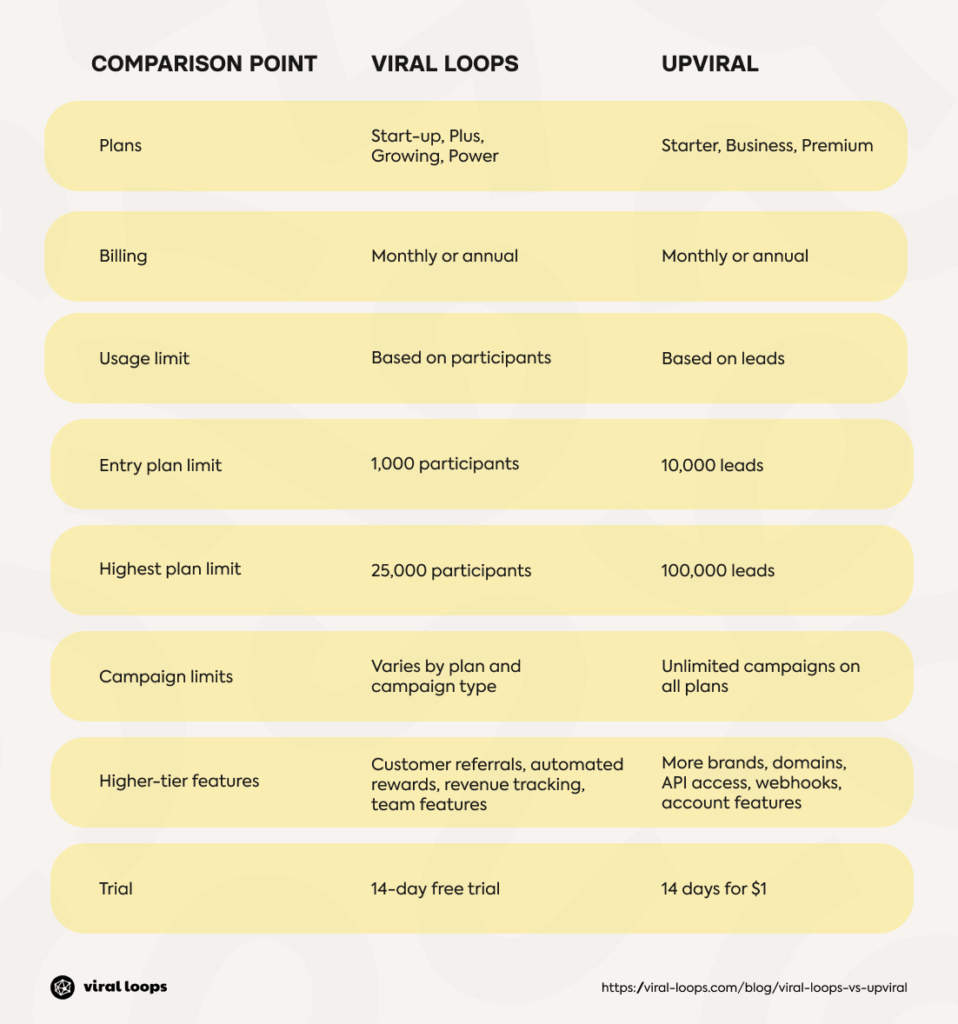
Pricing works differently on the two platforms. Viral Loops bases its plans on participant limits and adds more campaign and account features as you move up.
UpViral, by contrast, uses lead limits and gives every paid plan unlimited campaigns.
Both offer monthly and annual billing.
Viral Loops pricing
Viral Loops has four plans, with monthly rates starting at $49 for Start-up and reaching $399 for Power. Annual billing lowers those rates to $35 and $279 per month.
Start-up covers lead generation campaigns, while the Plus plan adds customer referrals and the Milestone Referral template. The Growing plan adds automated rewards and referral revenue tracking, and Power includes team invites, priority support, and a dedicated account manager on annual plans.
A 14-day free trial offers access to the Growing plan for up to 10 participants.
UpViral pricing
UpViral offers three plans: Starter, Business, and Premium. Monthly rates are $99, $149, and $399, respectively, while annual billing lowers them to $79, $119, and $319 per month.
Starter allows up to 10,000 leads, Business raises the limit to 25,000, and Premium covers up to 100,000. All include unlimited campaigns and visitors, with higher tiers adding more brands, domains, and account features.
The platform also offers 14 days of access for $1 before the selected subscription begins.
Which is better?
On pricing, Viral Loops offers smaller teams a lower-cost entry point, while UpViral includes higher-end limits and unlimited campaigns on every plan.
If you want to start small and pay more as your referral program grows, Viral Loops makes more sense.
If you expect larger campaign volumes from the start and want fewer limits on the number of campaigns you run, UpViral is a better fit.
Comparison point #3: Integrations
Integrations become crucial once a referral campaign has to work with the rest of your marketing setup.
Both platforms offer built-in connections and other ways to pass campaign data between tools, but they take different approaches to how those connections work.
Viral Loops integrations
Viral Loops connects with several tools that teams already use for email, CRM, analytics, and campaign automation.
The main options include:
- Mailchimp, Klaviyo, ActiveCampaign, Mailjet, and Kit for syncing referral participants with email lists.
- HubSpot for passing referral data into CRM workflows.
- Shopify for running customer referral campaigns directly in your online store
- Google Analytics for tracking campaign activity and conversions.
- Segment and Mixpanel for sending referral data into a broader analytics setup.
- Tremendous and Stripe for sending digital rewards to participants in eligible campaigns.
- Zapier for connecting Viral Loops with other apps when a direct integration is missing.
These connections cover the main parts of the referral workflow without forcing you to move data by hand.
UpViral integrations
UpViral works with a wide mix of marketing and website tools that are also available with Viral Loops. The difference lies in which tools each platform supports and how the connections are set up.
Alongside the shared integrations, UpViral offers:
- AWeber for adding campaign leads to email lists and sending follow-up messages
- GetResponse for sending campaign leads to email lists
- GoTo Webinar and WebinarJam for collecting sign-ups through webinar campaigns
- Kartra for connecting referral campaigns to sales funnels and email sequences
- ClickFunnels for connecting campaigns with funnel pages.
These integrations help you move leads from UpViral into your existing marketing tools and follow up with them after the campaign.
Which is better?
For integrations, Viral Loops offers more ways to connect referral data with the rest of your marketing setup. Its integrations go beyond email tools and site builders, which helps when a campaign depends on several different systems.
UpViral can work well for simpler setups built around lead capture and email follow-up. It also connects with website builder and funnel tools, which helps campaign-focused workflows.
Comparison point #4: User experience (UX)
A good user experience comes down to how quickly you can get a campaign running and how easy it is to manage afterward.
Viral Loops UX
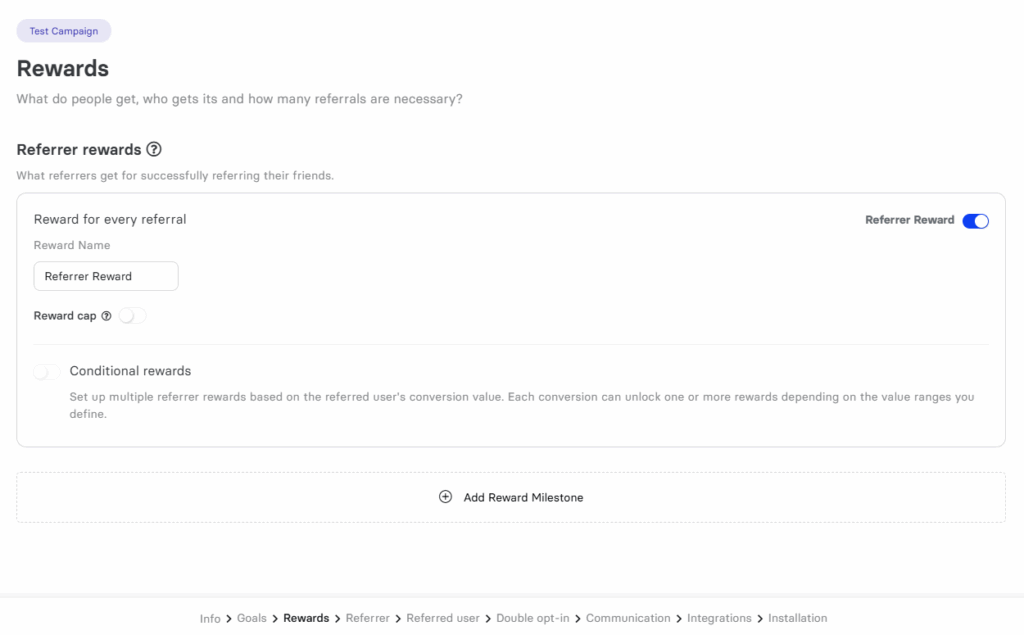
In Viral Loops, campaign setup starts with a template. Then, the campaign wizard walks you through the choices needed for that particular referral flow. Instructions change based on the template you select, reducing guesswork during setup.
The page builder follows the same approach. You can move sections around using drag-and-drop, edit the content directly, and watch the page update as you work. You can change colors, fonts, images, and spacing, or add customizable widgets.
You can then preview the page on different screen sizes and switch between the version people see before joining and the one they see afterward.
Once the campaign is running, the dashboard is easy to read.
The first numbers you see are participants, referred leads, shares, and successful referrals. You can filter them by date if you need a closer look at a specific period or search for individual participants if you need to update their details.
For anything you want to look at outside the dashboard, there is a CSV export option. It includes more detailed participant and referral data, so you are not limited to what fits on the dashboard screen.
UpViral UX
UpViral gives you three ways to start a campaign: a quick setup, a ready-made template, or a custom build.
The custom route walks you through each stage of the campaign-building process, so you can work through them in order instead of jumping between separate screens.
The visual editor uses drag-and-drop controls for page elements, and previous campaign pages can be reused instead of rebuilt.
Which is better?
For UX, Viral Loops is easier to follow if you want a template-led referral program and a shorter path from setup to reporting.
UpViral gives users more choices at the start, which works well if you prefer to build each stage yourself. However, for a gentler learning curve, Viral Loops has the advantage.
Comparison point #5: Referral marketing
Referral marketing sounds simple on paper: you give people a reason to share your product or business, track who they bring in, and reward them when they hit the desired goal.
In practice, the setup behind that process can look quite different from one referral marketing platform to another.
Viral Loops referral marketing
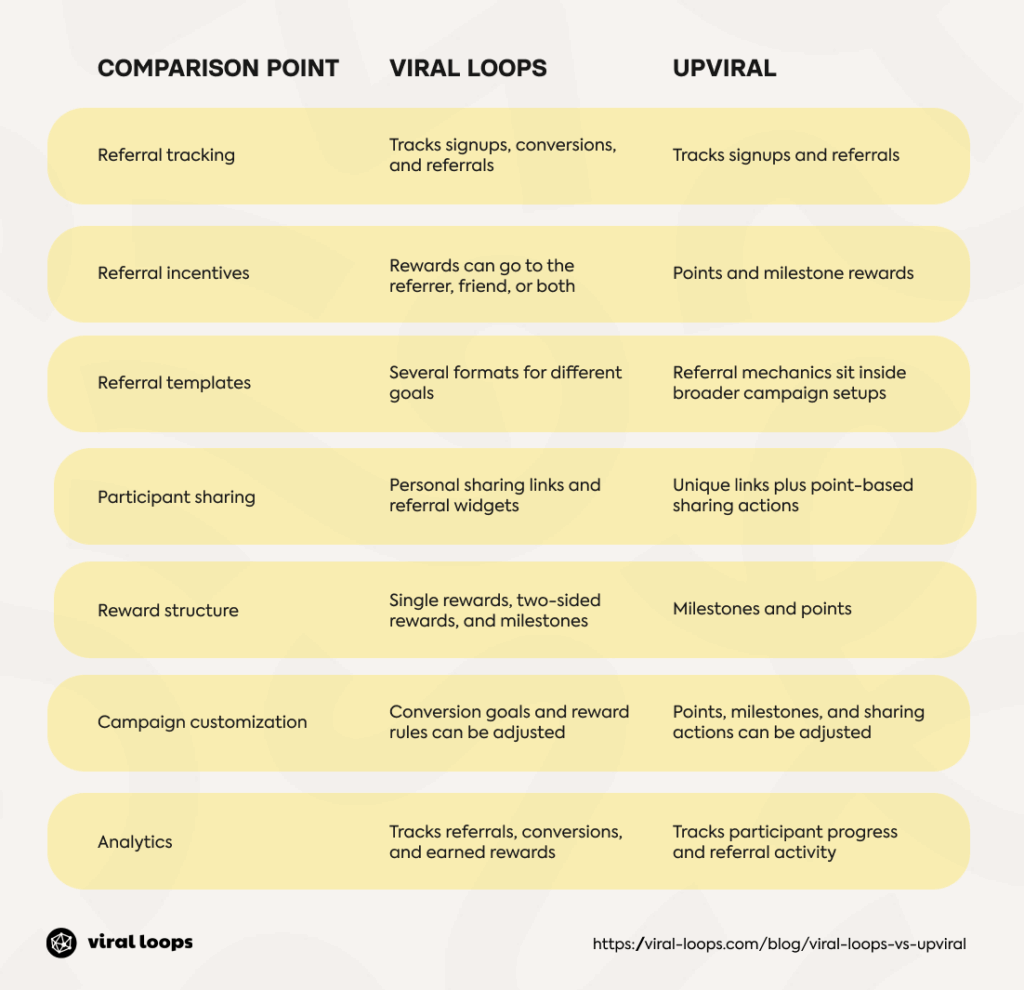
With Viral Loops, you have a lot of control over what counts as a successful referral: it can be a sign-up, a purchase, or another action that matters to your business.
Participants get their sharing link and can follow their progress from a referral page or widget. Rewards can go to the referrer, the invited friend, or both.
Milestone campaigns add another layer by offering better rewards as participants bring in more people.
The Viral Loops dashboard shows who referred a new customer and which rewards they earned, so you can track performance after the campaign goes live.
UpViral referral marketing
UpViral turns referrals into a points-based campaign. Each participant gets their own referral link and earns points when someone signs up through it.
You can also give points for selected sharing actions.
You can set milestone rewards as well. For example, a participant can unlock one reward after three referrals and another after five or ten. The platform tracks that progress and can automatically send digital rewards.
Which is better?
For referral marketing, Viral Loops gives you more room to shape the program around a specific goal.
You can choose different referral formats, decide what counts as a successful conversion, and set rewards around the action you care about.
On the other hand, UpViral works better for campaigns built around points and repeated sharing. Its milestone rewards keep participants working toward the next incentive.
Comparison point #6: Campaign types
The campaigns you plan to run are another thing to consider when comparing Viral Loops and UpViral. Both platforms support giveaways and referral campaigns, for example, but they offer different setup options.
Let’s look at the campaign types available on each platform and what you can use them for.
Viral Loops campaign types
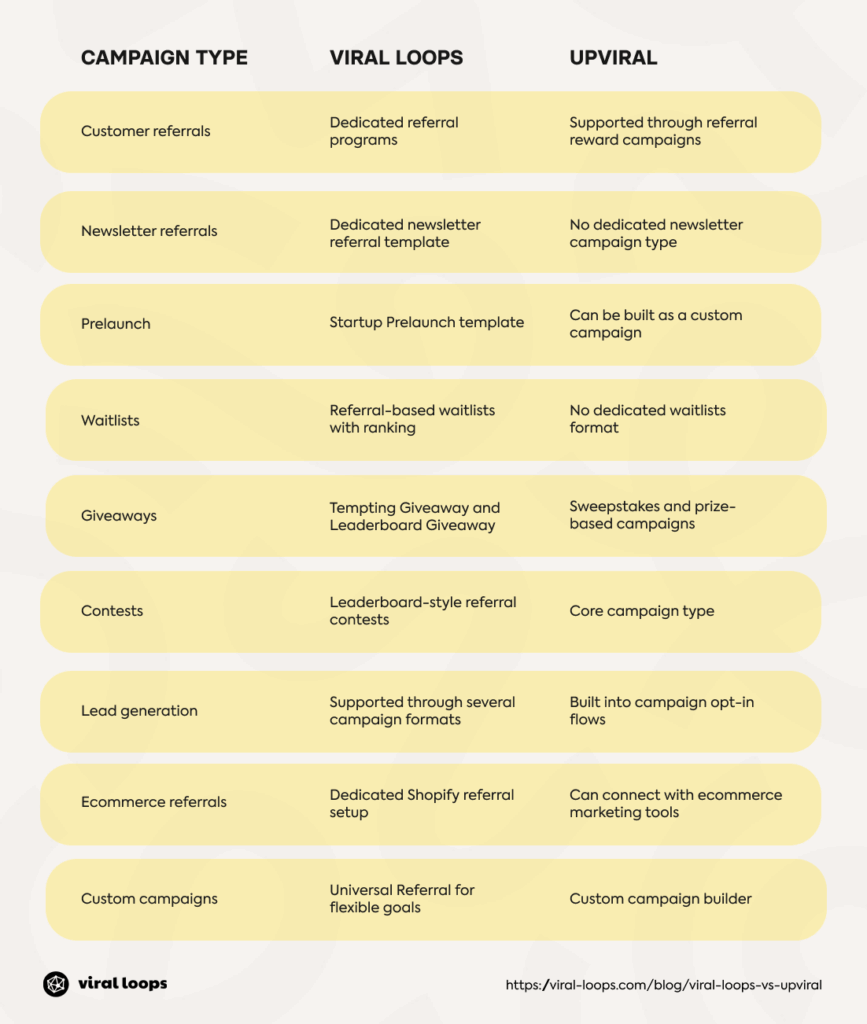
You can use Viral Loops for any one of the following campaign goals using different templates:
- Customer referrals: Reward existing customers for bringing in new customers.
- Newsletter referrals: Reward your subscribers for bringing new readers to your newsletter.
- Startup prelaunch: This is the best option for launches, as it turns referrals into a viral waitlist where participants move up the waitlist by inviting friends.
- Giveaways: These come in two formats. One gives participants an extra chance to win for referring friends, and the other ranks participants on a leaderboard by how many people they bring in.
- Shopify referrals: Run campaigns for your Shopify store, with rewards tied to customer referrals and purchases.
UpViral campaign types
UpViral offers a few campaign types you can choose from, mostly built around giveaways and contests:
- Sweepstakes and giveaways: Offer a grand prize and give people more chances to win by referring friends.
- Leaderboard contests: Participants compete for prizes by collecting points through referrals and different actions
- Milestone campaigns: Reward participants when they reach a specific referral target
- Mix and Match campaigns: Combine sweepstakes with milestone rewards. Participants can earn prizes along the way while also competing for the grand prize.
UpViral also lets you build a custom campaign if the ready-made setup doesn’t match what you have in mind.
Which is better?
In terms of campaign types, Viral Loops has dedicated formats for customer referrals, newsletter programs, giveaways, and prelaunch waitlists.
UpViral is more focused on campaigns built around prizes, sharing, and capturing leads.
If you want an ongoing referral program or a prelaunch campaign, Viral Loops holds the wider mix. If your main event is a contest or sweepstakes, UpViral is a better fit.
Comparison point #7: Online reviews
Features and pricing can help you compare Viral Loops and UpViral, but they don’t tell you much about what it’s like to use either platform.
That’s why we also looked at customer reviews on G2, Trustpilot, and Capterra. They give us a better idea of how the tools work in day-to-day use, what users like, and where they run into trouble.
Viral Loops online reviews
On main software review sites, Viral Loops scores well. For example, Capterra rates it 4.6/5 from 137 reviews, Trustpilot shows 4.7/5 from 130 reviews, and G2 lists 4.0/5 from 42 reviews.
In individual reviews, Lana K. writes on Capterra, “It’s easy to use, and the support team is helpful.” She also mentions wanting more design options for her referral program.
On G2, Carmelo A. praises the templates, integrations, and campaign tracking. His main complaint is that “some advanced customization options require technical knowledge or coding.”
Tim L. also liked the platform’s referral tracking and HubSpot integration. He says that choosing the right campaign took “a bit of trial and error” but admits that they skipped the free onboarding session.
UpViral online reviews
On the review sites where it has a meaningful presence, UpViral has strong ratings. For instance, Capterra lists a 4.8/5 rating from 107 reviews, and G2 shows 4.4/5 from 14 reviews.
Reviewers often mention the quick campaign setup and ease of use. For example, on Capterra, Richenel V. praises the campaign automation, saying, “99% of the viral process is fully automated.” He also likes the customization options, although he mentions having to use webhooks or HTML forms for some integrations.
Mark C. shares a similar opinion on G2. He likes how UpViral automates referral contests but admits, “There’s a learning curve as with any software.”
Integrations come up again in Nicholas O.’s review. While he likes the interface, he writes, “UpViral scores poorly on native integration.”
Mihailo T. also finds the platform easy to use but would like more options for embedding campaigns on his website.
Final verdict
UpViral has its advantages, particularly for businesses that use giveaways to generate leads. The platform offers plenty of options for running contests, with built-in split testing to see which approach performs better.
Its reward system also gives you flexibility in how you encourage people to share your campaigns.
Viral Loops is worth a closer look if you want referrals to be a continual part of your marketing campaign.
The platform’s dedicated setup for customer referrals and newsletters, plus separate options for prelaunch campaigns and Shopify stores, lets you build around your conversion goal and decide what action earns a reward.
You can also track referrals and change the campaign format as your needs change, and even build a custom referral flow if the ready-made template falls short.
If that sounds like what you need, you can book a demo with Viral Loops and try it out.
Frequently asked questions (FAQs)
What is the difference between Viral Loops and UpViral?
When comparing the two platforms, the differences come down to what each can do for you. Viral Loops is better for businesses that want ongoing referral programs, while UpViral focuses more on promotional campaigns.
Viral Loops is a good fit for long-term referral marketing, and UpViral is an efficient alternative for shorter campaigns built around prizes and participation.
Is Viral Loops better than UpViral?
Neither platform is better for every campaign. If you want referrals to run as an ongoing part of your marketing, Viral Loops is a better pick.
UpViral, however, deserves a closer look if your campaigns lean more toward giveaways, contests, and prize-based sharing.
The better option depends on how you plan to use it.